How Many Charge Cycles Does a Phone Battery Last?
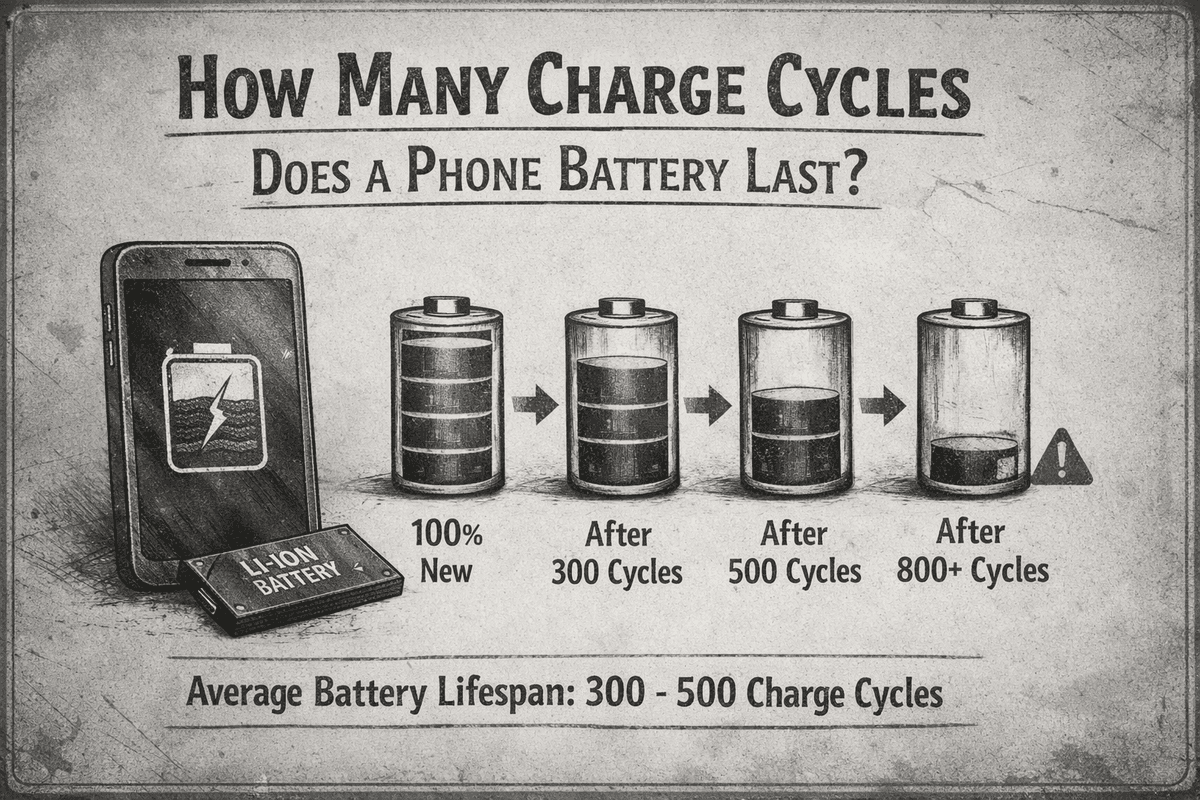
Table of Contents
You know that feeling when your phone was hitting 100% charge and lasting all day — and now it barely scrapes through to dinner? Yeah, we have all been there. It is one of those slow, creeping problems that sneaks up on you. One day your phone is fine, and the next you are hunting for an outlet by noon.
The culprit? Your battery's charge cycles. But what exactly is a charge cycle, how many does your phone have, and what can you actually do about it? Let's break it all down in plain English — no engineering degree required.
What Is a Charge Cycle, Really?
A charge cycle is not simply plugging your phone in once and unplugging it. That is a common misconception. A full charge cycle equals 100% of your battery's total capacity being used but it does not have to happen in one sitting.
Here's a simple way to think about it: if you use 50% of your battery on Monday, then charge it back to 100%, then use another 50% on Tuesday — that counts as ONE charge cycle, not two. Your phone is quietly keeping track of these cycles in the background, ticking away every time you drain and recharge.
Modern smartphones use lithium-ion (Li-ion) or lithium-polymer (Li-Po) batteries. These are great at holding charge and being recharged many times but they are not immortal. Every cycle wears the battery down ever so slightly.

So How Many Charge Cycles Does a Phone Battery Actually Last?
Most smartphone batteries are designed to retain about 80% of their original capacity after approximately 300 to 500 full charge cycles. After that threshold, the degradation tends to become more noticeable your battery holds less charge, drains faster, and may even start behaving unpredictably.
Apple officially states that iPhone batteries are designed to retain up to 80% of their original capacity after 500 complete charge cycles under normal conditions. Many Android manufacturers follow similar standards, though specifics can vary by brand and model.
Now let's put that in real-world terms. If you are charging your phone once a day which most people do 500 cycles equals roughly 500 days, which is just under a year and a half. That lines up with why most people start noticing battery issues somewhere between 18 months and 2 years of use.
Quick Reference: Battery Cycles by Brand
Apple iPhone — ~500 cycles to 80% capacity
Samsung Galaxy — ~300–500 cycles (varies by model)
Google Pixel — ~400–500 cycles
OnePlus — ~500 cycles
Most Android phones — ~300–500 cycles depending on battery tech
Keep in mind these numbers reflect lab conditions. Real-world usage — heat, fast charging, letting the battery hit 0% can reduce that lifespan.
What Happens as Battery Cycles Add Up?
Battery degradation does not happen overnight — it is a slow, gradual process. Think of it like a rubber band being stretched over and over. Early on, it snaps right back. But after hundreds of stretches, it starts losing its elasticity.
As cycles accumulate, the chemical compounds inside the battery that store electrical energy begin to break down. The result? Your battery's maximum capacity shrinks. A phone that originally lasted 12 hours on a charge might only last 8 or 9 hours after two years of daily use — even if you are charging it just as often.
Some signs that your battery has seen better days include:
1.Your phone dies much faster than it used to
2.The battery percentage jumps around unpredictably
3.Your phone shuts off suddenly even when showing 10-20% battery left
4.The phone gets noticeably warm while charging
5.Apps warn you about battery health being low
How to Check Your Battery Health Right Now
The good news? You do not have to guess. Both iOS and Android give you ways to peek under the hood.
On iPhone (iOS):
Go to Settings > Battery > Battery Health & Charging. You will see your battery's maximum capacity displayed as a percentage. If it is at 100%, great. If it is dipping below 80%, Apple considers it due for replacement.
On Android:
Android is a bit more fragmented — the option depends on your phone maker. Samsung users can check Settings > Battery and Device Care > Battery. Some phones let you access a secret diagnostic menu by dialing ##4636#*#* in the Phone app. For a more detailed view, apps like AccuBattery (available on the Play Store) can track your charge cycles and give you battery health estimates.
Habits That Are Quietly Killing Your Battery Faster
Some everyday habits accelerate battery wear without most people realizing it. Here is what to watch out for:
Charging to 100% every night: Lithium batteries prefer not to sit at full charge for long periods. It puts stress on the cells.
Draining to 0% regularly: Letting your phone die completely is harder on lithium batteries than keeping it somewhere in the middle.
Using fast charging constantly: Fast chargers are convenient, but they generate more heat — and heat is a battery's worst enemy.
Leaving your phone in a hot car: High temperatures accelerate chemical breakdown inside the battery.
Wireless charging overnight every night: Wireless charging is less efficient and generates more heat than wired charging.
Smart Charging Habits to Extend Your Battery Life
Here's the part you actually came for — what you can do right now to squeeze more life out of your battery's limited charge cycles.
Stay in the 20–80% zone: Charging within this sweet spot reduces stress on the battery and slows degradation. Many newer phones let you set a charging limit to stop at 80%.
Avoid extreme temperatures: Try not to leave your phone in direct sunlight, in your car on a hot day, or in freezing cold for extended periods.
Use optimized charging features: Both iOS and Android now have optimized charging modes that learn your habits and slow the charge to 100% right before you wake up — reducing the time the battery spends at maximum capacity.
Do not use your phone while it charges (especially with gaming): Heavy processing + charging = heat. Heat kills batteries.
Store the phone at around 50% if you are not using it for a while: Storing at full or empty charge accelerates degradation when unused.
When Should You Actually Replace Your Battery?
Once your battery health drops below 80%, most experts recommend replacing it — especially if you plan on keeping your phone for another year or two. At this point, the degradation curve tends to steepen, and things can get frustrating quickly.
Battery replacement is often more affordable than people assume. Apple charges a fixed fee depending on your iPhone model, and third-party repair shops can often do it cheaper. Many Android devices — especially Samsung and Pixel — are also serviceable.
The simple math: if your phone otherwise works great and a battery swap adds another 1–2 years of life, it is almost always worth it compared to buying a brand new device.
Does More Expensive Mean Better Battery Life?
Not necessarily. Premium flagship phones from Apple and Samsung often have similar cycle ratings to mid-range devices. Where higher-end phones sometimes win is in software optimization — they tend to manage battery usage more efficiently, making the charge last longer day-to-day.
Some budget brands have actually been experimenting with longer-lasting batteries by simply fitting larger capacity cells (measured in mAh). A phone with a 5000mAh battery will naturally last longer per charge cycle than one with a 3000mAh battery — even if both degrade at the same rate.
Final Thoughts
Your phone battery is not going to last forever — and that is okay. Understanding how charge cycles work puts the power back in your hands. Whether it is changing how you charge, knowing when to replace the battery, or just setting realistic expectations, a little knowledge goes a long way.
The average smartphone battery will handle somewhere between 300 and 500 charge cycles before you start noticing a real difference. That is roughly 1.5 to 2 years of daily use. After that, it is not the end of the world — it is just time to give your phone a little TLC in the form of a fresh battery.
Take care of your battery, and it will take care of you — at least until you inevitably upgrade anyway.
Try Our Battery Cycle Life Calculator
Estimate remaining battery cycle life and replacement timing.
Battery Cycle Life Calculator
Estimate remaining cycles and replacement timeline
Device
Usage & Health
Frequently Asked Questions

Written by
BatteryGuides Editorial Team
Our team of battery experts researches and tests every guide to ensure accuracy. We're committed to helping you get the most out of your phone, laptop, and solar batteries.


