Can a Swollen Battery Explode? What You Need to Know to Stay Safe
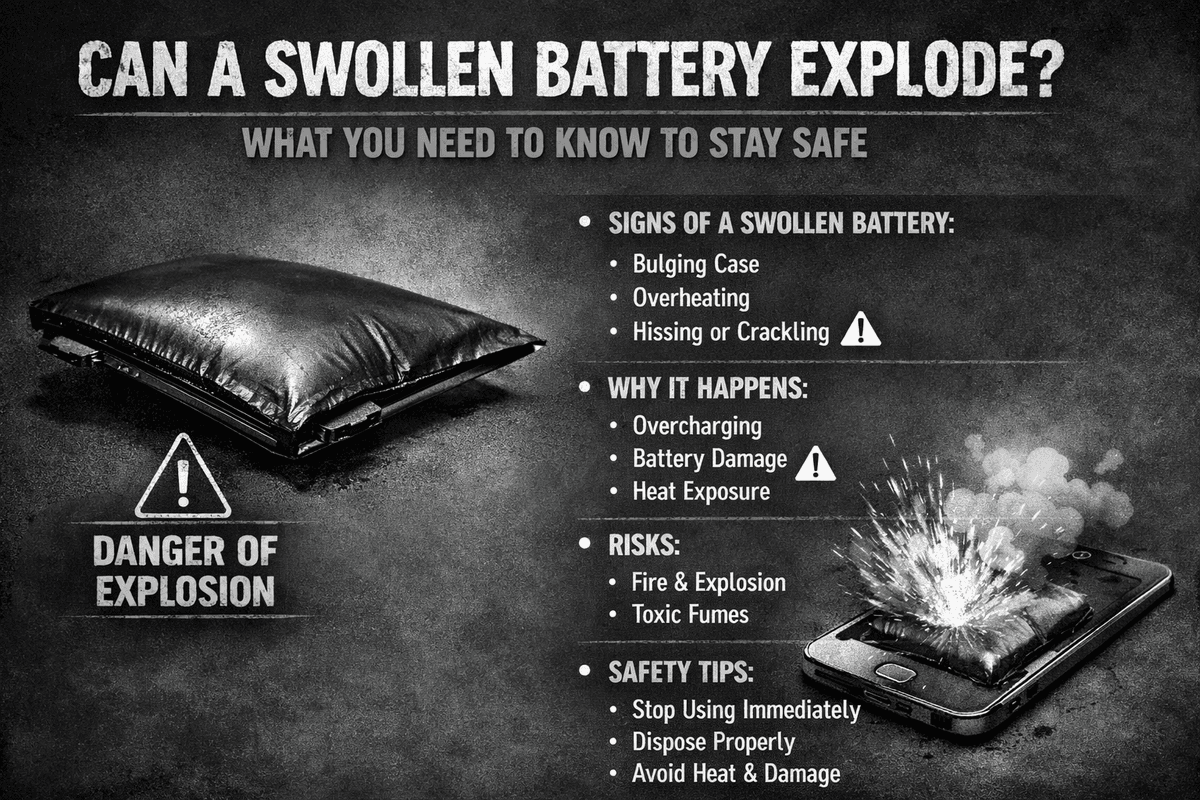
Table of Contents
- Overcharging the Battery
- Using Incompatible or Low-Quality Chargers
- High Temperature Exposure
- Battery Aging and Natural Degradation
- Physical Damage to the Battery
- Screen or Back Cover Lifting
- Device Overheating During Normal Use
- Rapid and Unexpected Battery Drain
- Unusual Smell or Visible Leakage
- Stop Using the Device Immediately
- Power Off the Device
- Never Press, Puncture, or Try to Flatten It
- Get the Battery Replaced by a Professional
- Dispose of It Properly
- Use High-Quality Chargers and Cables
- Keep Your Battery Away from Heat
- Protect Your Device from Physical Damage
- Keep Moisture Away from Your Devices
- Don't Wait Too Long to Replace an Aging Battery
If you've ever noticed your phone's screen lifting slightly or your laptop feeling unusually warm, there's a chance your battery might be swollen. It's one of those things people tend to ignore — but shouldn't. A swollen battery is not just a minor inconvenience. It's your device sending you a serious warning signal.
So can a swollen battery actually explode? The short answer is yes — but not always, and not immediately. Understanding why batteries swell, what the warning signs look like, and what to do about it can make a real difference in keeping you and your devices safe.
What Actually Happens When a Battery Swells?
Battery swelling happens when gas builds up inside a lithium-ion battery due to unstable internal chemical reactions. Under normal conditions, these reactions are controlled and predictable. But when something goes wrong — whether it's heat, age, or physical damage — the chemistry becomes unstable and gases start to accumulate inside the battery casing.
Most swollen batteries don't explode outright. But if left ignored or handled the wrong way, they absolutely can rupture, leak toxic chemicals, or catch fire. That's why a swollen battery should never be treated as something you can deal with later. It demands immediate attention.

Common Causes of Battery Swelling
Understanding what triggers battery swelling in the first place is the first step toward preventing it. Here are the most common culprits:

Overcharging the Battery
Leaving your device plugged in long after it hits 100% puts continuous stress on the battery. This can cause a process called "overplating" of lithium, which generates heat and gas inside the battery. Most modern devices have built-in protection circuits to prevent this, but constant trickle charging over months and years can still slowly wear down the battery's chemistry and increase swelling risk.
Using Incompatible or Low-Quality Chargers
This is one of the most overlooked causes of battery swelling. A charger that isn't properly matched to your device can deliver unstable voltage and poorly regulated current. Over time, this instability creates excess heat during every charging session, which accelerates the internal reactions responsible for swelling.
Always use a good quality charger that supports the correct charging protocols for your device — ideally one with USB Power Delivery (PD) support and proper thermal management. A reliable charger doesn't just charge your device faster, it charges it safer. It's a small investment that goes a long way in protecting your battery's long-term health.
High Temperature Exposure
Heat is one of the most damaging things for a lithium-ion battery. Leaving your phone in a hot car, sitting in direct sunlight, or storing your laptop in a poorly ventilated bag can raise battery temperatures to dangerous levels. Excessive heat dramatically speeds up the internal chemical reactions inside the battery, causing gas to build up much faster than normal.
Even occasional exposure to extreme heat can do lasting damage. It's one of those risks that compounds quietly over time until it becomes a visible problem.
Battery Aging and Natural Degradation
No battery lasts forever. After hundreds of charge and discharge cycles, the internal materials inside a lithium-ion battery naturally become less stable. The electrodes degrade, the electrolyte breaks down, and the whole system becomes more prone to swelling.
This is completely normal — but it does mean that older devices, especially those four or five years old or more, are significantly more likely to develop swollen batteries. If your device is aging, it's worth keeping a closer eye on it.
Physical Damage to the Battery
Dropping your phone, bending your laptop, or putting pressure on a device in your bag can cause physical damage to the battery — even if the damage isn't immediately visible from the outside. Even minor internal damage can disrupt the battery's structure and trigger the chemical instability that leads to swelling over time.
Warning Signs of a Swollen Battery
Catching a swollen battery early can prevent a much worse situation down the line. Here are the key warning signs to watch for:
Screen or Back Cover Lifting
This is often the most visible sign. If you notice your phone's screen starting to separate from the body, or the back panel lifting slightly, battery swelling is almost certainly the cause. The gas buildup pushes outward on the device's casing, creating visible gaps that weren't there before.
Device Overheating During Normal Use
Every device generates some heat — that's normal. But if your phone or laptop is getting unusually hot during basic tasks like browsing or making calls, something is wrong. Excessive heat during normal use or charging can be a sign of internal battery stress or damage.
Rapid and Unexpected Battery Drain
A swollen battery loses efficiency. If your device's battery is draining much faster than it used to, or if it's shutting down unexpectedly even with charge remaining, the battery may be swollen or otherwise compromised.
Unusual Smell or Visible Leakage
This is a critical warning sign. If you notice a chemical or burning smell coming from your device, or if you can see any fluid leaking from the battery area, stop using the device immediately. These are signs of serious internal damage and require urgent attention.
What to Do If Your Battery Is Swollen
If you spot any of the warning signs above, it's important to act quickly and carefully. Here's what to do — and what to avoid:
Stop Using the Device Immediately
The moment you suspect your battery is swollen, stop using the device. Don't charge it, don't run heavy apps on it, and don't leave it running unnecessarily. Continued use puts additional stress on an already unstable battery and increases the risk of overheating or worse.
Power Off the Device
Turn the device off completely. Reducing electrical activity inside the device helps slow down the internal reactions that are causing the swelling. Keeping it powered off minimizes the risk until you can get it properly assessed.
Never Press, Puncture, or Try to Flatten It
This is extremely important. No matter how tempting it might be to try and press the swelling down, never apply physical pressure to a swollen battery. The battery's internal layers are delicate, and any puncture or excessive pressure can cause it to rupture instantly — releasing toxic chemicals or igniting.
Get the Battery Replaced by a Professional
Don't try to replace a swollen battery yourself unless you have professional training. Take the device to a qualified technician or an authorized repair center. They have the proper tools, safety equipment, and procedures to remove and replace a damaged battery without putting themselves or anyone else at risk.
Dispose of It Properly
A swollen battery should never be thrown into regular household trash. Take it to a certified battery recycling center or an electronics disposal facility. These places are equipped to handle damaged batteries safely and dispose of them in an environmentally responsible way.
How to Prevent Battery Swelling in the First Place
The good news is that most cases of battery swelling are preventable. Simple, consistent habits can go a long way in keeping your battery healthy for longer.
Use High-Quality Chargers and Cables
The charger and cable you use every single day have a direct impact on your battery's long-term health. A well-made charger with proper voltage regulation and thermal management reduces the risk of heat buildup and unstable power delivery — two of the biggest contributors to battery swelling. Look for chargers that support USB Power Delivery (PD) and have built-in safety protections. It's one of the easiest ways to protect your battery without changing anything else about your routine.
Keep Your Battery Away from Heat
Make it a habit to keep your devices out of hot environments. Don't leave your phone in the car on a warm day. Don't charge your laptop in bed where airflow is blocked. Don't leave devices in direct sunlight for extended periods. These might seem like minor things, but heat exposure is cumulative — it adds up over time and quietly accelerates battery degradation.
Protect Your Device from Physical Damage
Use a proper protective case and be mindful of how you store and carry your devices. Avoiding drops, pressure, and impacts protects not just the screen or outer shell — it protects the battery inside. Internal damage from physical impact is one of the causes of swelling that people often don't connect to the problem until it's too late.
Keep Moisture Away from Your Devices
Water and electronics are never a good combination, but moisture is specifically damaging to batteries. Even humidity over time can cause corrosion on internal components, leading to short circuits that trigger swelling. Keep your devices away from bathrooms, kitchens, and any environment with high humidity if they're not water-resistant.
Don't Wait Too Long to Replace an Aging Battery
If your battery is showing signs of age — draining unusually fast, overheating regularly, or struggling to hold a charge — don't wait for it to swell before you act. Replacing a battery proactively when it starts showing these signs is far safer and cheaper than dealing with the aftermath of a swollen or ruptured one.
The Bottom Line
A swollen battery is not something to ignore or put off dealing with. It's a clear sign that something has gone wrong inside your device, and the consequences of ignoring it can range from a damaged screen to a fire hazard. The good news is that with the right knowledge, most of this is preventable.
Use quality chargers that properly regulate power. Keep your devices away from heat and moisture. Handle them carefully to avoid physical damage. And pay attention to the warning signs your device gives you — they're there for a reason.
Taking battery health seriously doesn't require a lot of effort. It just requires consistency and the right habits. Do that, and your batteries will last longer, perform better, and stay far safer throughout their lifespan.
For more guides on battery safety, health tips, and charging best practices, visit bestbatteryguide.com.
Try Our Phone Diagnostic Flow
Walk through a step-by-step flow to diagnose charging issues.
Phone Diagnostic Flow
Answer questions to diagnose your charging issue
What's happening with your phone?
Frequently Asked Questions

Written by
BatteryGuides Editorial Team
Our team of battery experts researches and tests every guide to ensure accuracy. We're committed to helping you get the most out of your phone, laptop, and solar batteries.


